

You just hit send — and then you notice it. A small line underneath your message bubble that reads: “Sent as Text Message.” Suddenly your blue bubble has turned green, and you’re left wondering: Did it go through? Am I blocked? What just happened?
You’re not alone. This is one of the most Googled iPhone questions every year, and it confuses millions of users across both Apple and Android devices. Whether you’re on iOS 18, using the latest Android with RCS, or just trying to figure out why your iMessage switched — this guide covers everything clearly and completely.
Let’s decode the “sent as text message” meaning once and for all.
What Does “Sent as Text Message” Mean?
“Sent as Text Message” means your device delivered your message using standard SMS (Short Message Service) instead of an internet-based messaging platform like iMessage or RCS.
In plain language: your phone tried to send the message through the internet (iMessage or RCS) but couldn’t — so it fell back to your mobile carrier’s cellular network to get the message through.
SMS is the original text messaging technology that’s been around since the 1990s. It doesn’t require Wi-Fi or mobile data; it just needs a cellular signal. That’s why your phone uses it as a backup — it’s more universally reliable, even if it lacks the advanced features of iMessage.
Here’s the quick breakdown:
- Blue bubble = iMessage (sent over internet, Apple-to-Apple)
- Green bubble = SMS or RCS fallback (sent via carrier network)
- “Sent as Text Message” = notification confirming the SMS fallback happened
Sent as Text Message on iPhone
On iPhone, the Messages app tries to send every message through iMessage first. iMessage uses your Wi-Fi or mobile data connection to deliver texts, photos, videos, and reactions between Apple devices — for free, with encryption.
When iMessage can’t complete the delivery, your iPhone automatically switches to SMS and displays “Sent as Text Message” below the bubble. The bubble color changes from blue to green as a visual signal.
7 clear reasons this happens on iPhone:
- No internet connection — No Wi-Fi and no mobile data means no iMessage. Your phone falls back to SMS automatically.
- Messaging a non-Apple user — iMessage only works between Apple devices. Texting an Android user? It will always send as SMS.
- Recipient’s iMessage is turned off — If the other person has disabled iMessage in their settings, your message routes as SMS.
- Their phone is powered off or out of range — An offline device can’t receive iMessages, so your phone switches to SMS to ensure delivery.
- iMessage servers are temporarily down — Apple’s servers occasionally experience outages, triggering an automatic SMS fallback.
- The recipient switched from iPhone to Android — Their number may still be associated with old iMessage threads, but new messages go as SMS.
- You may be blocked (rarely) — In some cases, being blocked causes messages to reroute to SMS — but this is not a reliable indicator on its own.
To check or adjust your SMS fallback settings on iPhone:
Settings → Apps → Messages → Send as SMS (toggle on/off)
Sent as Text Message on Android
Android handles this slightly differently. Most modern Android phones (especially those running Android 9 and above) use RCS (Rich Communication Services) — Google’s upgrade to SMS that supports read receipts, typing indicators, high-quality media, and group chats — features similar to iMessage.
When RCS fails, Android falls back to SMS, and you may see a similar “Sent as text message” or “Sent via SMS” notification.
Common reasons on Android:
- RCS is not enabled in your Messages app settings
- The recipient’s device doesn’t support RCS
- You have a weak or unstable data connection
- Your carrier doesn’t support RCS in your region
- The recipient is on iPhone (prior to iOS 18’s RCS support)
Note: With iOS 18, Apple added RCS support, which means iPhone and Android users can now exchange higher-quality messages — though iMessage between Apple users remains separate and still uses blue bubbles.
Sent as Text Message iMessage vs SMS
Here’s a clear side-by-side comparison to understand the difference:
| Feature | iMessage | SMS |
|---|---|---|
| Color (iPhone) | Blue bubble | Green bubble |
| Connection needed | Wi-Fi or mobile data | Cellular signal only |
| Works cross-platform | Apple only | All phones |
| Read receipts | Yes (if enabled) | No |
| Encryption | End-to-end | No |
| Cost | Free (data used) | Carrier charges may apply |
| Typing indicator | Yes | No |
| Media quality | High | Compressed |
The fundamental difference comes down to internet vs. cellular carrier. iMessage is smarter and richer; SMS is universal and reliable as a fallback.
Did It Go Through?
This is the #1 follow-up concern — and the good news is: yes, in most cases, it did go through.
When your iPhone or Android sends a message as SMS, it uses your carrier’s cellular network. As long as:
- The recipient has a cellular signal
- Their phone is turned on
- You haven’t been blocked
…the message will be delivered as a standard SMS text. You may or may not see a “Delivered” confirmation depending on your carrier settings and the recipient’s phone.
What the status labels mean:
- Delivered — The message reached the recipient’s device
- Read — The recipient opened the message (only shown with iMessage or if enabled)
- No status — The message may be in transit, or delivery confirmation isn’t available for SMS
- Not Delivered — Something went wrong; tap the exclamation mark to retry
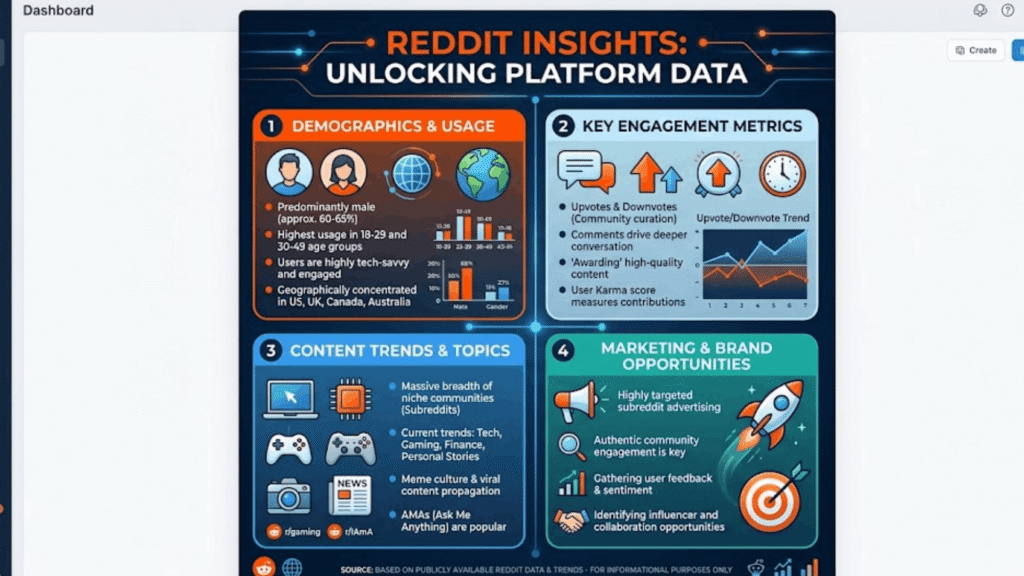
Reddit Insights
Reddit communities like r/applehelp and r/iphonehelp frequently discuss the “sent as text message” confusion. The consensus among experienced users:
- Network issues are the most common cause — not blocking
- Users report the green bubble appearing when recipients are traveling internationally or in low-signal areas
- Several threads confirm that iMessage server outages (which Apple logs at apple.com/support/systemstatus) cause mass fallback to SMS
- Many users note that someone switching from iPhone to Android is a common surprise trigger — old threads stay as iMessage history, but new messages suddenly go green
Reddit’s general advice: Don’t panic, don’t assume you’re blocked. Check your own internet connection first.
Also Read This: The Meaning of “In Text” (2026): A Powerful Breakdown of This Simple but Misleading Chat Term
iMessage Is Green and Says “Sent as Text Message”
If your iMessage bubble is green AND shows “Sent as Text Message,” these two signals together confirm the same thing: your message was delivered via SMS, not iMessage.
This specific combination typically means:
- Your phone attempted to send via iMessage
- iMessage was unavailable for one of the reasons listed above
- Your phone successfully switched to SMS as a fallback
- The message was delivered through your carrier’s network
The green color is Apple’s visual indicator that iMessage was not used. The text label adds a written confirmation of what happened.
This does NOT automatically mean:
- You are blocked
- The message failed
- The recipient is ignoring you
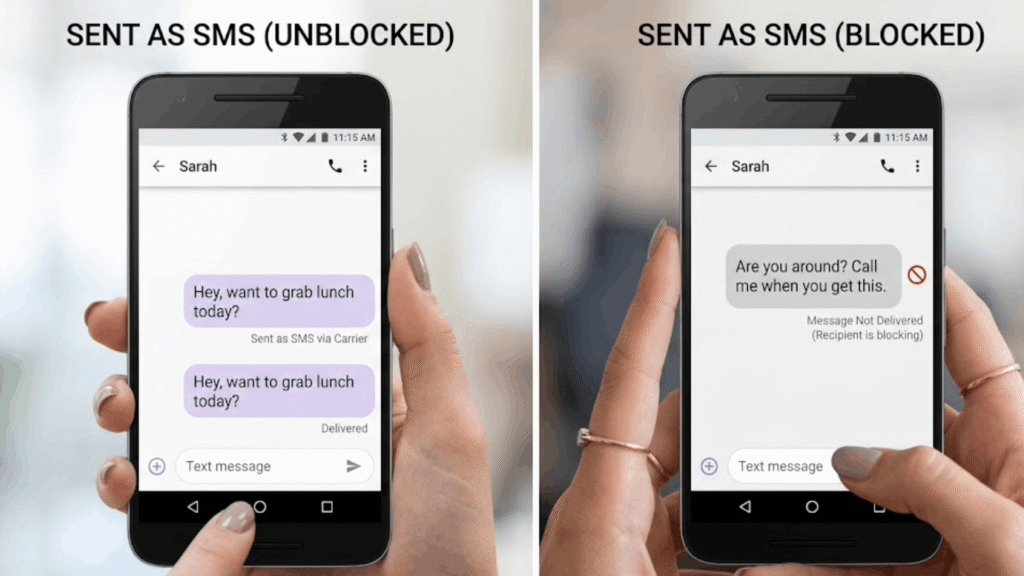
Does “Sent as SMS” Mean Blocked on Android?
This is a very common concern — and the answer is more nuanced than a simple yes or no.
On Android: If someone blocks your number, SMS messages sent to that number typically won’t deliver at all — you usually won’t receive any confirmation. The message may appear to send on your end, but it never reaches the recipient.
On iPhone: Being blocked doesn’t always produce “Sent as Text Message.” When you’re blocked by another iPhone user:
- Your message still appears blue (iMessage style)
- There is no “Delivered” confirmation shown
- The message silently fails — the recipient never sees it
So counterintuitively, seeing “Sent as Text Message” on iPhone can actually indicate you’re not blocked in the traditional sense — your message still traveled through the SMS network to reach them.
Bottom line: “Sent as SMS” alone is not proof of blocking on either platform. To check if you’re blocked, try calling — if it goes straight to voicemail every single time, that’s a stronger indicator.
Quick Summary Table
| Scenario | iPhone Behavior | Android Behavior |
|---|---|---|
| No internet | Falls back to SMS | Falls back to SMS |
| Texting Android user | Always SMS (pre-iOS 18 RCS) | RCS if supported, else SMS |
| Recipient offline | SMS fallback | SMS fallback |
| iMessage disabled | SMS only | N/A |
| Recipient blocked you | Blue bubble, no “Delivered” | Message fails silently |
| iMessage server down | SMS fallback | N/A |
| RCS unavailable | N/A (uses iMessage) | SMS fallback |
FAQs
Q: Does “Sent as Text Message” mean the other person received it? A: In most cases yes — SMS still delivers through your carrier as long as the recipient has cellular signal and hasn’t blocked you.
Q: Why does my iMessage keep sending as text message? A: The most common reasons are no internet connection, the recipient using Android, or iMessage being disabled on either device.
Q: Does green bubble always mean Android user? A: Not always — iPhone users can also get green bubbles if iMessage is off, they have no data, or Apple’s servers are down.
Q: Can I stop my iPhone from sending as text message? A: Go to Settings → Apps → Messages and toggle off “Send as SMS.” Note: messages may fail to deliver if iMessage is unavailable.
Q: Does “Sent as Text Message” mean I’m blocked? A: No — it’s not a reliable indicator of being blocked. There are many other reasons this happens first.
Q: Will I be charged for SMS messages? A: Depends on your carrier plan. Most modern unlimited plans include SMS, but international SMS may have extra costs.
Q: How do I know if my iMessage is working properly? A: Check Apple’s System Status page at apple.com/support/systemstatus and make sure iMessage is toggled on in Settings → Apps → Messages.
Q: What’s the difference between SMS and MMS? A: SMS is text-only (up to 160 characters); MMS (Multimedia Messaging Service) supports photos, videos, and longer messages — both use the carrier network.
What Is “Sent as a Text Message”? (Primary Meaning)
At its core, “Sent as a Text Message” is a delivery status notification built into iPhone’s Messages app. It appears below a message bubble to tell you that iMessage wasn’t used — instead, your phone routed the message through your mobile carrier’s SMS network.
Think of it like a GPS rerouting. Your phone tried the fastest route (iMessage), hit a roadblock, and immediately switched to a different path (SMS) to make sure your message still arrived.
Three Chat-Style Examples
Example 1 — No Wi-Fi:
[Blue bubble switches to green] “Sent as Text Message” “My Wi-Fi was out, that’s why it went green.”
Example 2 — Texting an Android friend:
“Hey, why are your messages always green?” “I’m on Android — iMessage doesn’t work cross-platform.”
Example 3 — Recipient switched phones:
“I’ve been trying to iMessage you but it keeps saying Sent as Text Message.” “Oh! I just switched to a Samsung — I should’ve told you.”
Why This “Sent as a Text Message” Meaning? Tone & Emotion
Seeing “Sent as Text Message” can trigger very different emotional responses depending on the context:
- Anxiety — “Did they block me?”
- Confusion — “Why did it change colors?”
- Frustration — “Why won’t iMessage work?”
- Relief — “At least it went through.”
The reality is that this notification is a feature, not a failure. Apple built this fallback system precisely so your messages always get delivered, even when internet-based messaging isn’t available. The green bubble and the “Sent as Text Message” label are transparency tools — your phone is keeping you informed about what just happened.
Other Meanings of “Sent as a Text Message” (Context Matters)
Beyond the technical explanation, this phrase can come up in multiple real-world scenarios:
1. iMessage → SMS Fallback
The most common meaning: your iPhone couldn’t use iMessage and switched to SMS automatically.
2. Cross-Platform (iPhone to Android)
iMessage is Apple-exclusive. Messaging any Android user will always result in SMS (or RCS in iOS 18+).
3. Receiver Has Turned Off iMessage
The recipient may have disabled iMessage in their own settings — perhaps intentionally to save data or fix a different issue.
4. The Person May Be Offline (Rarely: Blocked)
If someone is traveling, has poor signal, or their phone is off — iMessage fails, and SMS kicks in. Blocking is possible but far less common.
5. iMessage Servers Are Down
Apple’s iMessage servers occasionally go offline. Check apple.com/support/systemstatus for real-time status updates.
6. Business or E-Commerce Communication
In a business context, “sent as a text message” often refers to SMS marketing or transactional messages — like order confirmations, OTP codes, or delivery alerts — that brands send directly to customers’ phone numbers via carrier SMS rather than through internet apps.
When to Use It & When to Avoid It
When it makes sense
- When you want guaranteed delivery regardless of internet availability
- For quick communication when Wi-Fi is spotty
- When contacting someone on Android (prior to RCS support)
- For business communications reaching a wide audience across all phone types
When it might cause confusion
- If you regularly share media — SMS compresses images and videos significantly
- International contacts — SMS charges may apply across borders
- Group chats — SMS group threads lack the features of iMessage group chats
- Privacy-sensitive conversations — SMS is not end-to-end encrypted
/ Usage Table
| Use Case | Recommended? | Reason |
|---|---|---|
| Quick text to Android user | ✅ Yes | SMS is universal |
| Sending photos | ⚠️ Caution | Quality is compressed via MMS |
| International texts | ⚠️ Caution | Carrier charges may apply |
| Private/sensitive messages | ❌ No | No encryption in SMS |
| Emergency contact | ✅ Yes | Works without data/Wi-Fi |
| Group chats | ⚠️ Caution | Loses iMessage features |
4 Usage Tips
- Keep iMessage on with “Send as SMS” enabled as backup — you get the best of both worlds.
- Check your data connection before assuming something is wrong — most “Sent as Text Message” issues resolve on their own.
- Use Wi-Fi calling if you’re in a low-signal area and need iMessage to work reliably.
- Update your iOS regularly — newer versions handle iMessage/SMS fallback more smoothly and now include RCS support.
Real Conversation Examples
Friend Chat
Jake: Hey, are you coming tonight? (Sent as Text Message) Mia: Why did my message go green? Jake: Oh I think my Wi-Fi’s down — still got it though!
Social Media DM Conversation
Alex: I tried DMing you on Insta but also texted — got a “Sent as Text Message” notification. Sam: Yeah I saw your text. Instagram was being weird on my end too.
Marketplace Listing
Buyer: Is the item still available? (Sent as Text Message) Seller: Yes it is! (Reply via regular SMS) [Both on different platforms — SMS was the bridge]
Workplace Chat
Manager: I sent you the files. (Sent as Text Message) Employee: Got them! Must’ve been iMessage acting up — came through as a regular text.
E-Commerce Delivery Message
“Your order #4821 has shipped. Estimated delivery: Thursday. Track here: [link]” (Sent as Text Message — automated carrier SMS from retailer)
Related Slang
Understanding “Sent as Text Message” connects to a wider world of messaging terminology:
- Blue bubble — iMessage between Apple devices
- Green bubble — SMS or RCS; sometimes used informally to mean “Android user”
- RCS — Rich Communication Services; Android’s iMessage alternative
- MMS — Multimedia Messaging Service; SMS upgrade for media
- iMessage — Apple’s proprietary encrypted messaging service
- SMS fallback — The automatic switch from internet messaging to carrier SMS
- Read receipt — Notification showing a message was opened
- Delivered — Confirmation the message reached the recipient’s device
Platform Differences
Instagram / WhatsApp
These apps don’t use SMS at all. They operate entirely over the internet. You’ll never see “Sent as Text Message” within Instagram DMs or WhatsApp — but you might send an SMS about something you shared there.
TikTok
TikTok’s in-app messages are internet-based. However, “Send as Text Message” might come up when users share TikTok links via their native messages app, which then falls back to SMS.
Facebook / Marketplace
Facebook Messenger uses internet-only messaging. Facebook Marketplace sellers often contact buyers through both Messenger and SMS — in that context, “sent as a text message” confirms carrier delivery.
E-Commerce Sites
Brands and online retailers send transactional messages (order confirmations, shipping updates, OTP codes) via SMS deliberately — it reaches customers on any phone, on any carrier, without needing an app. These are intentional “text messages,” not fallbacks.
Workplace Chat Tools
Tools like Slack, Teams, and WhatsApp Business operate over the internet only. But when IT teams or HR departments send emergency alerts or two-factor authentication codes, they often go through SMS to guarantee delivery regardless of app availability.
Sent as a Text Message Blocked
If you’re worried that “Sent as Text Message” means you’ve been blocked, here’s the clearest answer possible: it is not a reliable indicator of being blocked.
When you’re genuinely blocked on iMessage, your message stays blue — but shows no “Delivered” status. The blocked recipient simply never receives it, and you’re never notified. If your message did route through SMS (green bubble, “Sent as Text Message”), it actually means your message traveled through the carrier network — which is a sign it likely reached the recipient.
To check if you might be blocked, try calling directly. If the call goes straight to voicemail immediately every single time (not once — consistently), that’s a stronger signal worth paying attention to.
Sent as a Text Message Meaning iPhone
On iPhone specifically, “Sent as Text Message” is a native Apple notification that appears below a message bubble in the Messages app. It confirms that iMessage was bypassed and your carrier’s SMS network was used instead.
Key iPhone-specific points:
- The bubble turns green (from blue) when this happens
- You lose read receipts and typing indicators in SMS mode
- The switch is automatic — you don’t need to do anything
- You can turn off SMS fallback in Settings if you prefer messages to fail rather than send as SMS
- With iOS 18, Apple introduced RCS support, adding a third messaging layer between iMessage and basic SMS
Understanding “Sent as Text Message” removes the anxiety around green bubbles. In almost every case, your message got through — your phone just used a different road to deliver it.
